Lesson 2: Introduction to Computer Parts
Chapter 2 study guide: quick notes, multiple-choice check, and short written answers.
1. Quick notes
Annotate and print
Use the tool bar at the bottom of the screen to highlight text, draw, and add sticky notes or text on top of these notes. Then save a PDF with or without your marks.
In the print window, choose "Save as PDF" as the destination. Chrome or Edge gives the best result.
What is a Computer?
- A computer is any digital device that follows four basic functions.
- Accepts input: keyboards, cameras, microphones.
- Processes data: transforms data into useful information.
- Provides output: displays images, videos, audio.
- Stores it: keeps data for future use.
Hardware vs Software
- Hardware: physical elements like processors, memory, storage, and ports.
- Software: virtual instructions that tell hardware what to do (e.g., OS, apps).
The System Unit "Case"
The case houses internal components such as the power supply, motherboard, CPU, memory, and disk drives. The Form Factor refers to the physical design of the case (e.g., Full Tower, Compact Tower, All-in-one).
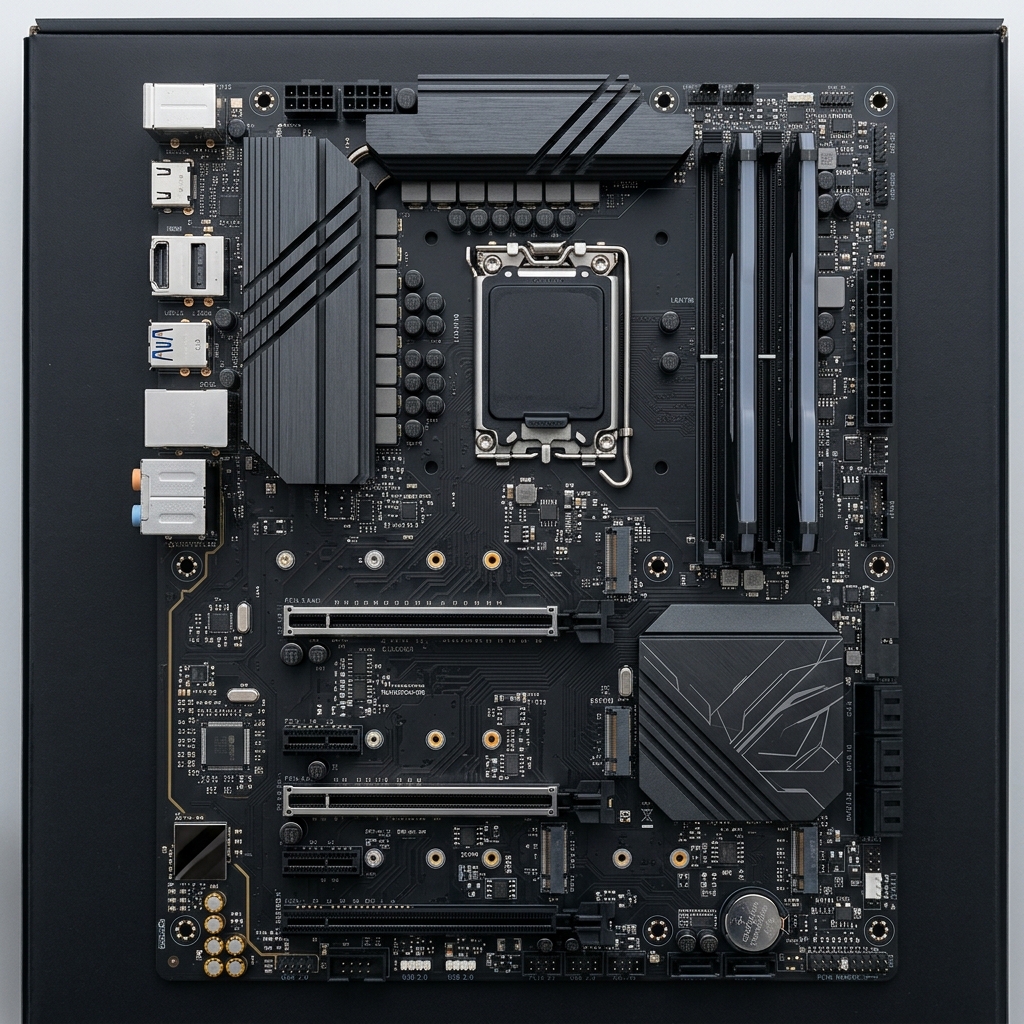
Motherboard
The main circuit board that connects all computer components together. It features a bus which acts as a road to move information between parts.
- Chipset: Acts as the communication hub. Historically split into Northbridge (high-speed) and Southbridge (lower-speed).
- In modern systems, the CPU handles the high-speed traffic directly, and the chipset handles the lower-speed traffic.
- Expansion Slots: PCI, Mini-PCI, and PCIe (PCI Express, 60 times faster than PCI).
- BIOS Battery: Keeps the computer's time correct even when unplugged.
CPU (Central Processing Unit)
The brain of the computer that performs all calculations.
- ALU (Arithmetic Logic Unit): Handles math and logic.
- CU (Control Unit): Manages and coordinates CPU activities.
- Registers & Cache: Super-fast memory built right into the CPU.
The Machine Cycle
The process of executing instructions:
- 1. Fetch: Get instruction from RAM or Cache.
- 2. Decode: CU translates it into readable language.
- 3. Execute: ALU performs the instruction.
- 4. Store: Save results back to RAM or registers.
CPU Performance & Cooling
- Clock Speed: Measured in Hertz (GHz). Shows how many machine cycles the processor can run per second.
- Overclocking: Running the CPU faster than recommended. Generates extra heat and voids warranty.
- Multi-Core: CPUs contain multiple processing units (Cores) allowing parallel processing.
- Cooling Systems: Passive (heatsink only), Active (fan + heatsink), or Liquid Cooling (highest efficiency). Thermal Paste ensures perfect contact between CPU and the cooler.
RAM vs Storage
| RAM (Random Access Memory) | Storage (Hard Disk) | |
|---|---|---|
| Purpose | Short-term memory for active apps | Permanent storage for files and OS |
| Volatility | Volatile (loses data when off) | Non-volatile |
| Types | DDR, Cache (L1, L2, L3) | HDD, SSD, NVMe |
Storage Measurements
- Bit: 0 or 1. Smallest unit.
- Byte: 8 bits.
- Kilobyte (KB): 1024 Bytes.
- Megabyte (MB): 1024 KB.
- Gigabyte (GB): 1024 MB.
- Terabyte (TB): 1024 GB.
- Petabyte (PB): 1024 TB.
Connectors and Cables
- Power Supply Connectors: ATX (20+4 pin), SATA power, PCIe power (4, 6, 8 pin).
- USB: Type A, B, Micro, C. Colors mean different speeds (White=1.5Mbps, Black=480Mbps, Blue=10Gbps+).
- Lightning: Apple's proprietary 8-pin connector.
- Ethernet: Network cables. CAT5e up to 1Gbps, CAT6 up to 10Gbps.
2. Multiple-choice check
Pick an answer to see right or wrong straight away, with a short explanation.
3. Short written questions
Try to answer in your own words first, then open the model answer.